Boosting Nvidia GPU Performance: A New Tool for AI Tasks
New open-source software removes artificial restrictions on Nvidia cards to boost AI processing speeds.
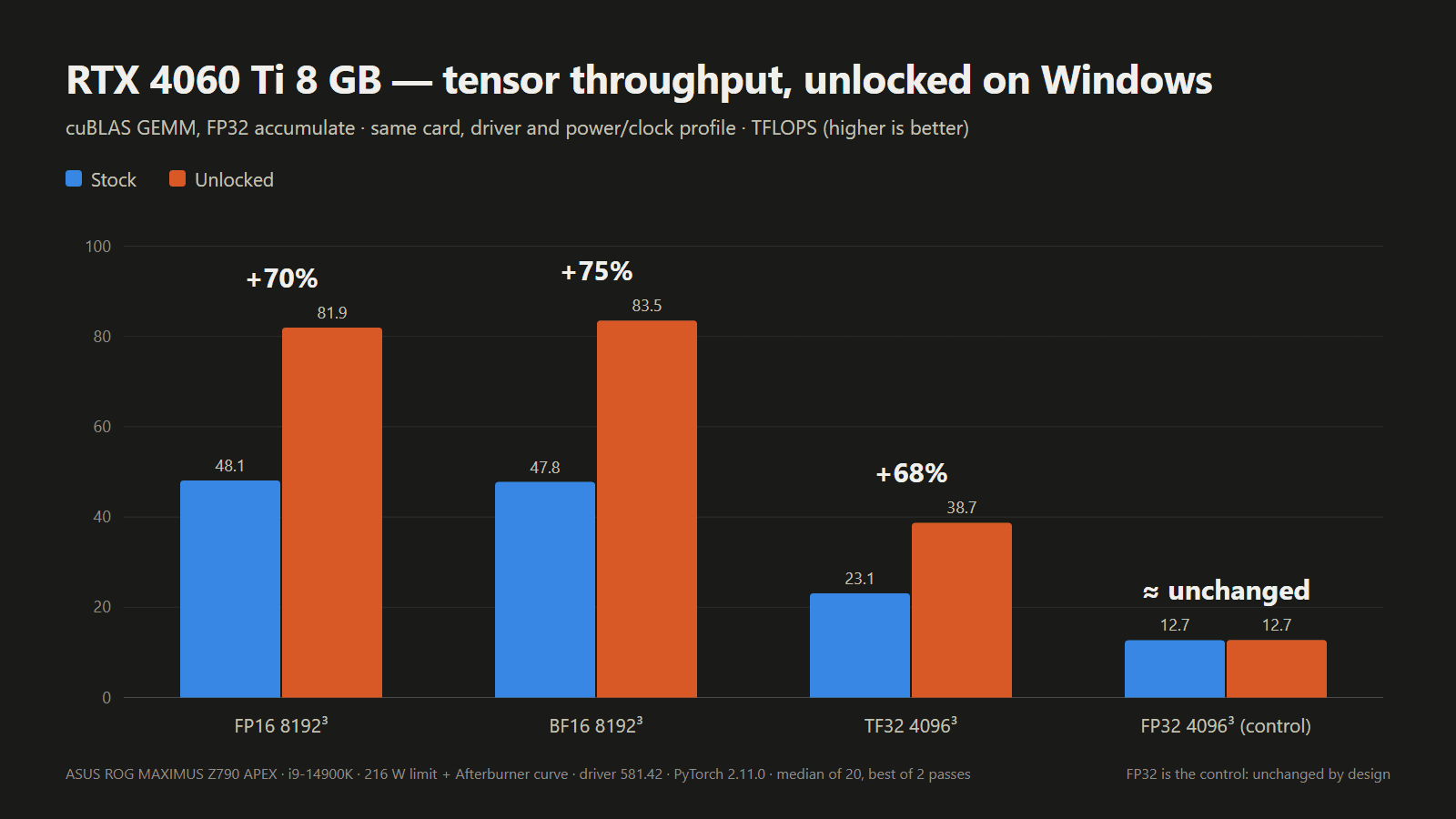
For owners of Nvidia graphics cards working on artificial intelligence (AI) tasks, a new opportunity has emerged. An open-source UEFI tool called nv-uefi-unlocker allows users to remove restrictions imposed by the company on RTX 20, 30, and 40-series video cards. This modification significantly increases the bandwidth of Tensor cores, improving FP16 mathematical calculation speeds by 65% or more.
How does the unlock work?
Traditionally, Nvidia imposes specific limitations on its consumer video cards to differentiate them from professional-series hardware. The new tool addresses this issue in a clever way: it operates at the UEFI level, before the operating system boots. When booting from a USB flash drive, the program tricks the Nvidia firmware into granting access to registers responsible for speed limits.
Importantly, this method does not require flashing the video card's BIOS or modifying drivers. Since the change is temporary and activates upon each boot, risks are minimized. However, users must ensure their system operates in UEFI mode, and Secure Boot must either be disabled or configured to trust self-signed EFI files.
Compatibility and limitations
The project officially supports both desktop and laptop GPUs from the RTX 20, 30, and 40 series. For instance, during testing, an RTX 4060 laptop GPU showed a 65% performance increase, while an RTX 4080 nearly doubled its performance in certain tests. Nevertheless, there are some nuances:
- RTX 50-series cards are not currently supported due to enhanced security systems.
- For laptops, using the dGPU mode is recommended.
- Some game anti-cheat systems may cause issues if Secure Boot is disabled.
Why is this important?
This tool is particularly interesting for those training small language models (LLMs) or working with generative AI at home. Previously, achieving similar results required installing complex Linux modules, but the process is now significantly simplified.
While the results are impressive, users should note that removing the card's performance limit increases power consumption and heat. Beginners are advised to be cautious with system cooling, as exceeding factory thermal limits may affect device stability. In the near future, developers plan to create an even simpler interface, making this "hack" accessible to a wider audience.